Proposal · 13 October 2026 · plan only, nothing built yet

AOL-Connect as an open platform for volunteers

Keep our one main app. Add one safe front gate, so every volunteer can use their own AI assistant, and chosen volunteers can build small tools for others. Every tool sees only what that volunteer may already see.

Contents
  1. 60-second summary
  2. The idea in one picture
  3. How others do it
  4. What we have today
  5. The target design
  6. Technical deep dive
  7. Roadmap and first step
  8. WhatsApp and Telegram
  9. Owner decisions
  10. Sources

For leadership

The 60-second summary

  • What we want. Volunteers ask their own AI assistant (ChatGPT, Claude or Grok) simple questions, like “Who should I call today?”, and get answers from AOL-Connect. A few chosen volunteers build small pages, like an event-day check-in screen.
  • What we keep. One main app for everyone. The same rules about who may see what. Nothing changes for people who do not use the new tools.
  • How it stays safe. Each tool gets a limited key for one person. The key can never do more than that person can do in our app. The AI never sees a password. Every question is logged. One switch stops everything.
  • The first step. 2–3 weeks. About 10 invited volunteers. Practice data only. Four read-only questions. Phone numbers partly hidden.
  • The cost. The first step uses the Cloudflare plan we already pay for. Volunteers use their own AI accounts. Later, builder pages need about USD 25 a month plus a web address.
  • What only you can decide. May real participant data go to outside AI companies? Who may become a builder? Can we spend the money for step 3? The Teachers CRM team decides for their own system.

Words we use

API
The list of actions our system can do for a program, for example “list my follow-ups”. Our own app already uses it.
Token (key)
A limited, temporary key. It works for one person and a few actions. It can be taken back. It is not the password.
OAuth
The standard way to give a tool a key: you sign in on our page and tap Allow.
MCP connector
A standard plug that lets AI assistants call our actions. ChatGPT, Claude and Grok can use it.
Builder
A chosen volunteer who makes a small page or tool for other volunteers.
Sealed box
A Cloudflare service that runs each builder page alone. The page cannot reach our database. It can only call our front gate.

Overall architecture

The idea in one picture: one engine, many doors

Today only our own app can use the engine. Tomorrow more doors open, but all of them go through one gate that checks the same rules.
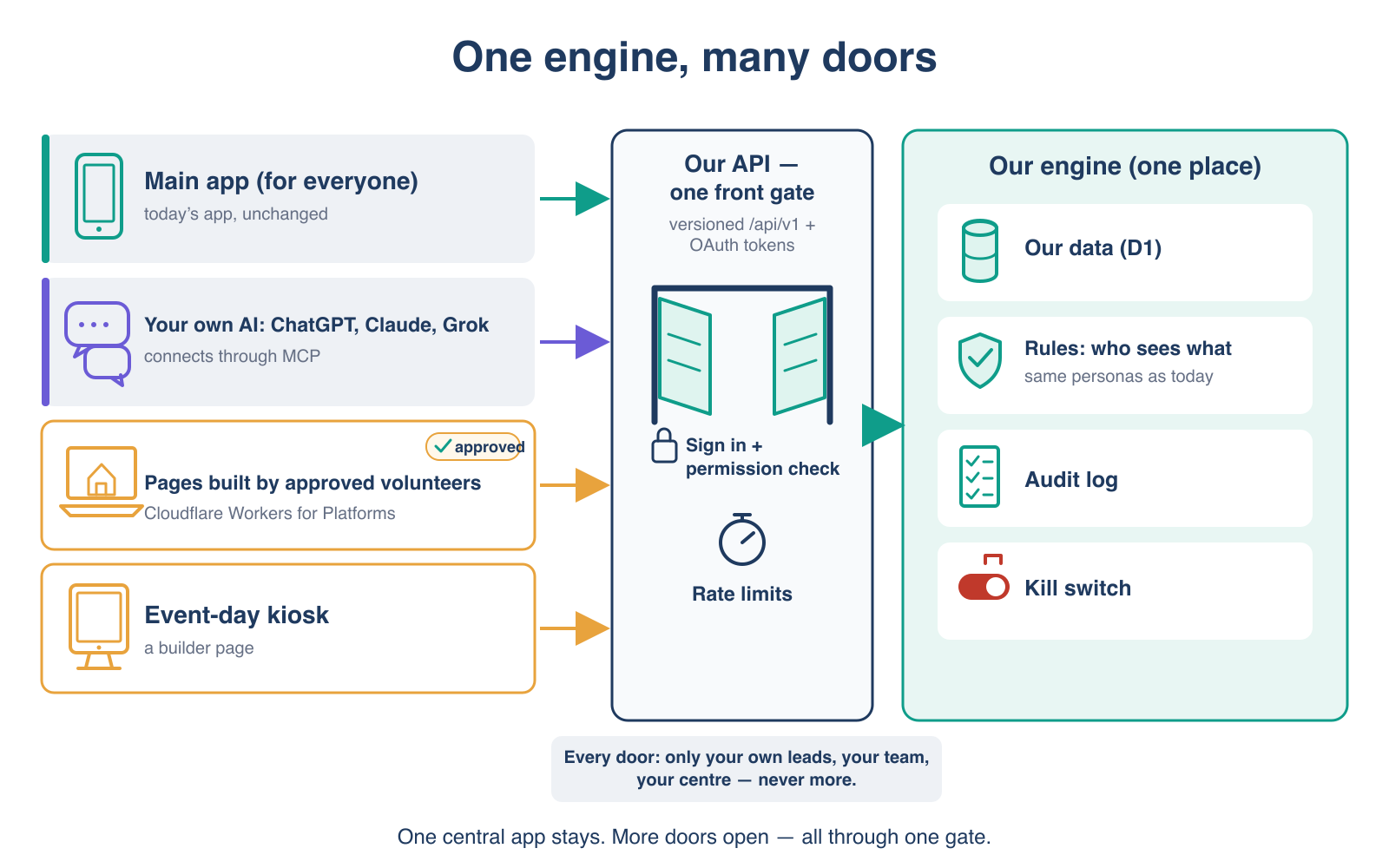
Diagram: one engine, many doors. Three kinds of door on the left: the main app for everyone, unchanged; a volunteer's own AI (ChatGPT, Claude or Grok) connecting through MCP; and pages built by approved volunteers on Cloudflare Workers for Platforms, such as an event-day kiosk. All three enter one front gate, which handles sign-in, permission checks and rate limits. Behind the gate is one engine with our data, the rules about who sees what, an audit log and a kill switch. Footer: every door shows only your own leads, your team or your centre, never more.
One central app stays. New doors open only through one gate, with the same rules.

What it makes possible: ten examples

These are things volunteers could use or build. Each one shows only what that person may already see.

Own AIVolunteer · step 1 read, step 2 update

Follow-up helper in your own ChatGPT, Claude or Grok

“Who should I call today?” Then “mark this lead as spoke, interested”. The change waits until you tap Confirm in AOL-Connect.

Own AIVolunteer · step 1

Kannada or Hindi voice helper

Ask in Kannada using the AI app's voice mode. The answers come only from your own leads.

Own AIVolunteer · step 1

Monday digest

A scheduled task in your AI tool sums up your week and lists overdue follow-ups.

Own AIVolunteer · step 1

Call-script coach

The AI drafts a short call script in Kannada for the programme the person asked about.

Builder pageTeacher · step 3

Event-day check-in page

A tablet at the door. The volunteer approves it with a short code on her own phone, then searches today's registrations and marks attendance.

Builder pageCoordinator · step 3

Team dashboard

Weekly calls, sign-ups and overdue follow-ups for my teams. Numbers only, no personal data.

Builder pageCentre · step 3

Centre notice screen

Upcoming sessions and seats left, on a TV in the centre. No personal data.

Builder pageBuilder · step 3

Large-text page for older volunteers

Three big buttons: my calls today, my next event, help.

Builder pageBuilder · step 4

Seva shift planner

For a big event: volunteers pick shifts, and the coordinator sees the gaps.

Builder pageBuilder · step 3

Course finder for a centre website

A small widget that shows upcoming public courses. Public course data only.

Later, the same pattern could serve the Teachers CRM, for example: “Who registered for my course next week, and who has not paid?”, asked in a teacher's own AI tool. That is for the Teachers CRM team to decide.

Examples from other platforms

How others do it

Large platforms now open their data and actions to AI assistants and outside builders. They share three habits: the tool acts with the user's own permissions, an admin approves each tool, and outside code runs in a sandbox.

Comparison (public information read on 13 Oct 2026)
PlatformOpen to AI assistantsOutside buildersSafety habit we copy
SalesforceHeadless 360: the platform as APIs, MCP tools and a command line; hosted MCP serversCustom pages in a sandbox; marketplace appsAgents work inside the user's permissions; admin-approved client apps; security review before listing
ShopifyStorefront MCP lets AI agents search products and manage cartsHeadless shops built on the Storefront API (Hydrogen)A small, chosen set of actions for agents, next to the normal API
HubSpotHosted MCP server for CRM data, with OAuth 2.1 and PKCEApps and UI extensions inside the CRMA short, purpose-built tool list, not the whole API
MicrosoftDataverse MCP server for Copilot Studio and other MCP clientsPower Apps code apps (React and similar)Admins allow each AI client separately
OpenAIChatGPT apps and connectors built on MCP, with OAuth 2.1Developers publish appsStandard sign-in; the token is for one server only
Anthropic and xAIClaude custom connectors (remote MCP); Grok through the xAI API with remote MCP tools—The user adds the connector and signs in; review each tool call
MCP + CloudflareOpen standard and ready building blocks for an MCP server with OAuthWorkers for Platforms runs each customer's code aloneOutbound guard; limits per app; no direct database access

Salesforce

In April 2026 Salesforce announced Headless 360: its platform as APIs, MCP tools and a command line. Agents work inside the user's existing permissions and sharing rules. Registered agents get their own identity and can have fewer rights than a person. Hosted MCP servers need an admin-approved client app and PKCE. Custom pages run in a per-namespace sandbox, and listed apps pass a security review.

We copy: user-level permissions, admin approval, sandbox, review. We do not copy: paid marketplace, per-call billing, our own agent builder.

Sources: Headless 360 announcement · Agent API · Lightning Web Security

Shopify

Shopify is a well-known “headless” platform: shops build their own front end (often with Hydrogen) on top of the Storefront API. Shopify now also offers Storefront MCP, so AI agents can search a shop's products and work with carts through a short list of actions.

Lesson: one engine, many front ends, and a separate small action list for AI.

Source: Shopify Storefront MCP docs

HubSpot

HubSpot runs a hosted remote MCP server that lets AI clients read and update CRM records. It uses OAuth 2.1 with PKCE and offers a purpose-built set of tools rather than the whole API. Developers also build apps and UI extensions that show inside HubSpot.

Lesson: a CRM like ours can safely give AI a short, chosen tool list.

Sources: HubSpot MCP server · Spring 2026 developer spotlight

Microsoft

The Dataverse MCP server connects business data to Copilot Studio and other MCP clients. Admins manage it centrally and allow each client separately. Power Apps code apps let developers build their own web front ends on the same data.

Lesson: the admin decides which AI clients may connect.

Sources: Dataverse MCP in Copilot Studio · Dataverse MCP tool shape (blog)

OpenAI (ChatGPT apps)

ChatGPT apps and connectors are built on MCP. Sign-in follows OAuth 2.1 as the MCP standard describes. ChatGPT prefers a newer way to identify itself (client metadata documents). Which ChatGPT plans can add a custom connector was not clear on 13 Oct; we test it in the pilot.

Source: OpenAI Apps SDK: authentication

Claude and Grok

Claude supports custom connectors (remote MCP) on Free (one connector), Pro, Max, Team and Enterprise plans. That is why the pilot starts with Claude. Grok, through the xAI API, can call remote MCP tools with a fixed key, so later we add a personal read-only key for Grok users.

Sources: Claude custom connectors · xAI remote MCP tools

MCP, the open standard

The Model Context Protocol is the common plug between AI assistants and tools. Its current version is dated 28 July 2026. It says: the server checks every token, the token must be made for that server, scopes stay small, and a person should be able to refuse a tool call.

Sources: MCP authorization · MCP tools

Cloudflare (where we already run)

Cloudflare gives ready parts: a library for OAuth 2.1 on Workers, a guide for remote MCP servers, and Workers for Platforms, which runs each customer's code in its own Worker with an outbound guard and limits. It costs USD 25 a month, including 1,000 scripts.

Sources: Workers for Platforms · Remote MCP server guide · workers-oauth-provider

Current state

What we have today

Both systems already have good rules about who may see what. But only our own apps can come in. There are no keys for outside tools and no AI connector.
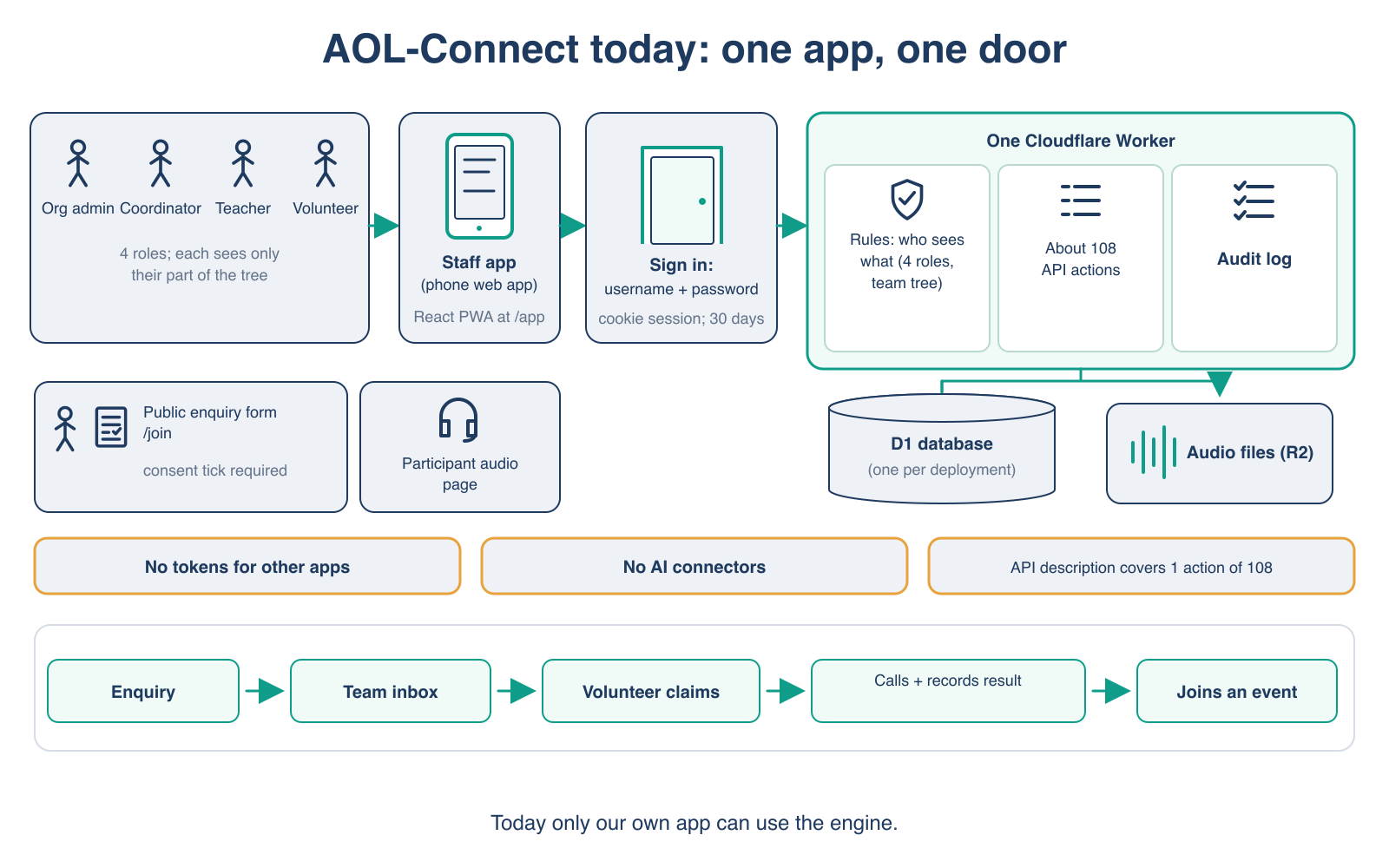
AOL-Connect today

Diagram: AOL-Connect today, one app, one door. Four roles (org admin, coordinator, teacher, volunteer) use one staff phone web app and sign in with username and password. The app talks to one Cloudflare Worker that holds the rules about who sees what, about 108 API actions and an audit log, with one database per deployment and audio file storage. A public enquiry form with a consent tick and a participant audio page sit below. Three gaps are listed: no tokens for other apps, no AI connectors, and an API description that covers only 1 of 108 actions. The workflow runs: enquiry, team inbox, volunteer claims, calls and records result, joins an event.
AOL-Connect today: strong rules, one door for our own app.

How it runs

One Cloudflare Worker and one database for each deployment. A phone-friendly staff app. The public enquiry form and the participant page are simple server pages.

Who sees what

Four roles: org admin, coordinator, teacher and volunteer, placed on a team tree. One central rule hides every field a role may not see. A volunteer sees only her own leads and her team's inbox.

Main workflow

A person fills the public form with a consent tick. A coordinator accepts it as a lead. A volunteer claims it, calls, and records the result. The lead is booked on an event and attendance is marked.

What is missing for a platform

Sign-in is a browser session for our own app only. No keys for outside tools, no AI connector, and the machine-readable API description covers only a small part of the actions.
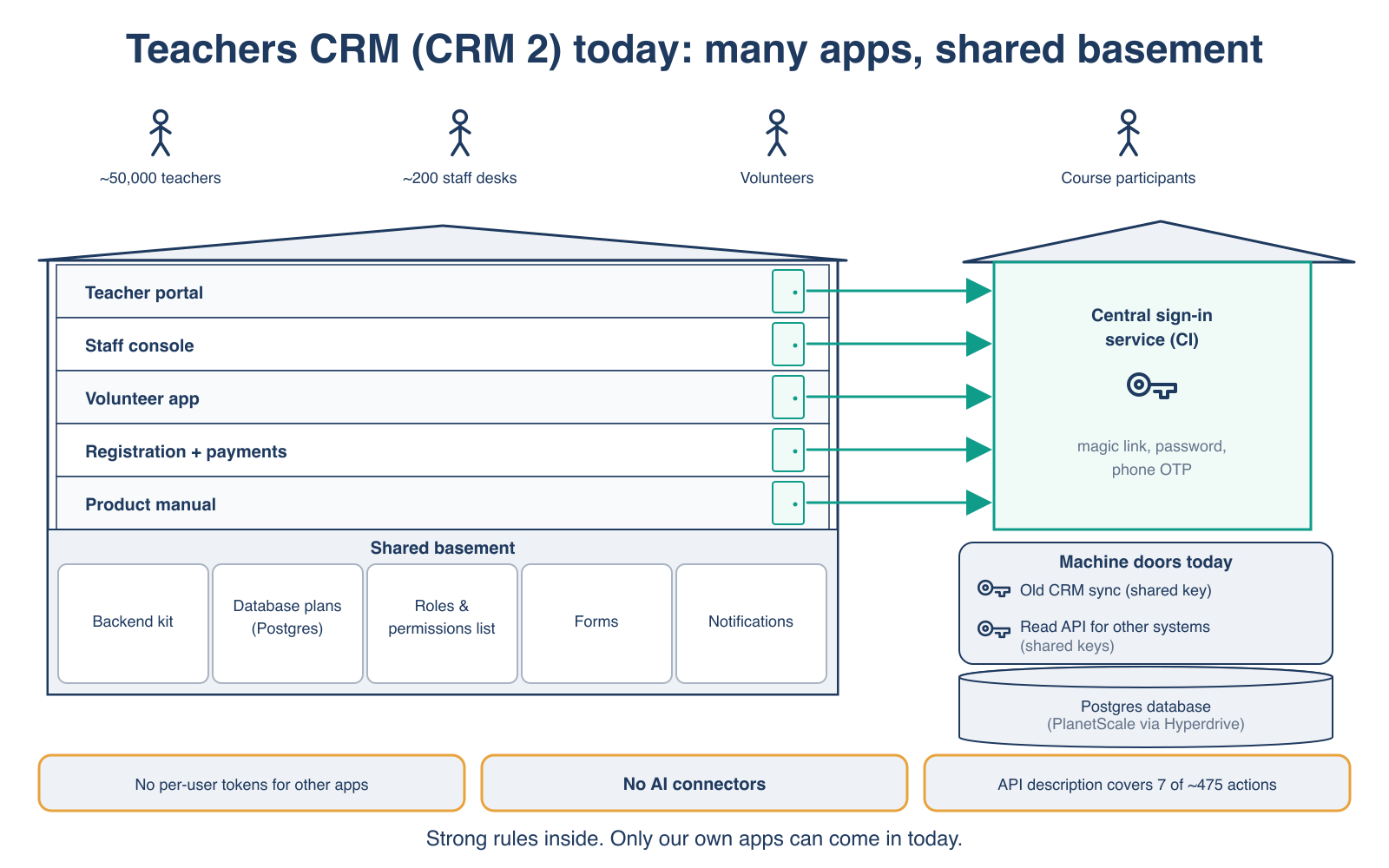
Teachers CRM today

Diagram: Teachers CRM today, many apps on a shared basement. Teachers, staff, volunteers and course participants use five apps: a teacher portal, a staff console, a volunteer app, registration and payments, and a product manual. Each app connects to a separate central sign-in service that offers magic link, password and phone one-time code. The shared basement holds a backend kit, database plans, a roles and permissions list, forms and notifications. Machine doors today use shared keys: an old CRM sync and a read API for other systems. A Postgres database sits below. Three gaps: no per-user tokens for other apps, no AI connectors, and an API description that covers 7 of about 475 actions.
Teachers CRM today: many apps, one central sign-in, strong permissions inside.

How it runs

Several apps in one code base (teacher portal, staff console, volunteer apps, registration and payments) on Cloudflare Workers, with a Postgres database.

Who sees what

A separate central sign-in service. A clean list of permissions in the form “area: action”. Other systems connect today with shared keys.

Ownership

The Teachers CRM belongs to the group team. We share the design with them. They decide if and when it follows.

What both share

Strong rules inside. One cookie-based door. No per-user keys for outside tools. A thin API description. No AI connector.

Target design

The target: one safe front gate

We build one gate in front of the rules we already have. We do not build a second copy of the rules.
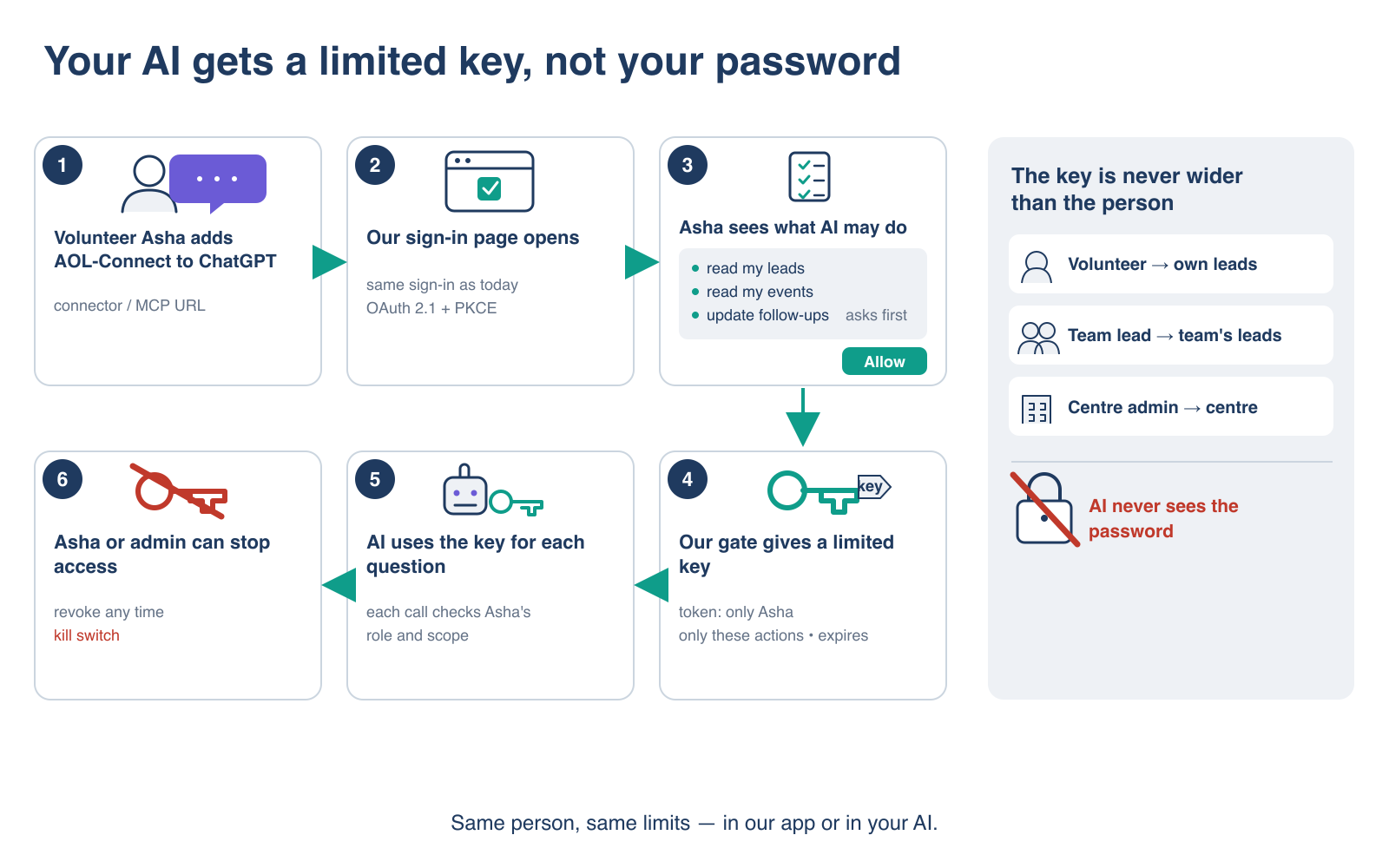
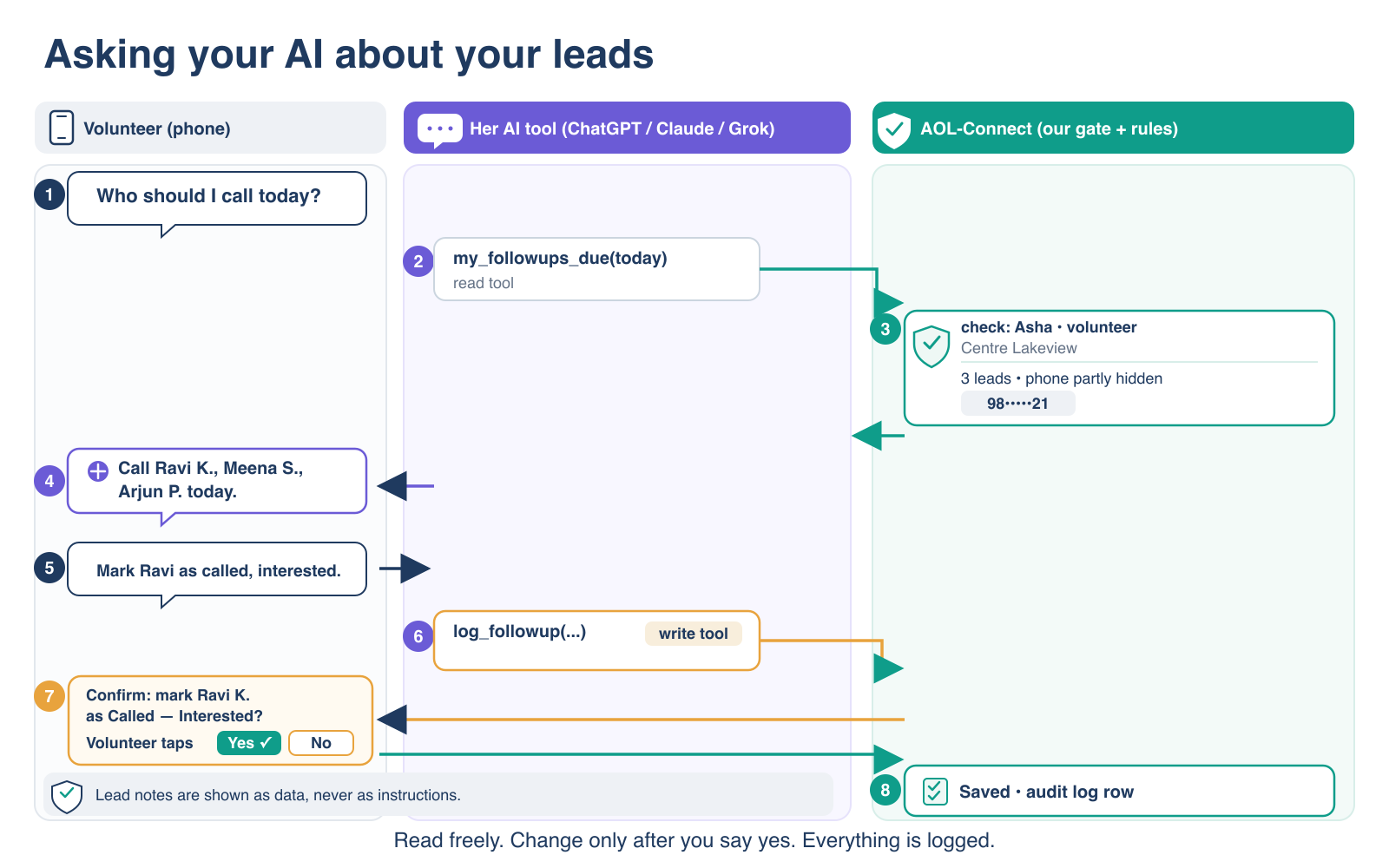
The key is never wider than the person. Every outside request runs the same checks as our own app, for the same person and role.
One gate, closed by default. An action is open to keys only if we list it on purpose. Everything else refuses keys.
Participant text is data. No note or comment can change what the gate does.
No new layers. A few lines in our existing router and two small, well-known libraries.

1. Identity: each volunteer's own login and a limited key

Diagram: your AI gets a limited key, not your password. Six steps with Volunteer Asha, an invented person. She adds AOL-Connect to ChatGPT as a connector. Our normal sign-in page opens. She sees what the AI may do: read my leads, read my events, and update follow-ups, which asks first, then taps Allow. Our gate gives a limited key that works only for Asha, only for these actions, and expires. The AI uses the key for each question, and each call checks Asha's role and scope. Asha or an admin can revoke the key at any time, and there is a kill switch. A side panel says the key is never wider than the person: a volunteer sees own leads, a team lead the team's leads, a centre admin the centre. The AI never sees the password.
The volunteer signs in on our page and taps Allow. The AI gets a key, never the password.
  • The volunteer uses the same sign-in as today. A new consent page shows, in plain words, what the tool asks for.
  • The key holds: who, which role, which tool, which actions, and when it expires. Keys are short-lived and renew in the background.
  • On every request we check again that the person and the role are still active. If not, the request fails.
  • A person who asked not to be contacted, or asked to be erased, never appears in any tool answer.
  • The volunteer can see and remove each connected tool. An admin can remove any tool for everyone.

2. The AI connector (MCP): read first, change only after “yes”

Diagram: asking your AI about your leads. Three columns: the volunteer on her phone, her AI tool (ChatGPT, Claude or Grok), and AOL-Connect with our gate and rules. She asks who she should call today. The AI calls a read tool for follow-ups due today. AOL-Connect checks that she is a volunteer at Centre Lakeview and returns three leads with phone numbers partly hidden. The AI suggests three invented names to call. She asks to mark one as called and interested. The AI calls a write tool, and AOL-Connect shows a confirm question. Only when the volunteer taps Yes is the change saved and an audit log row written. Lead notes are shown as data, never as instructions.
Read freely within your own scope. A change waits for a tap on our own page. Everything is logged.
  • The tool list follows the key. A volunteer's AI sees only the tools her actions allow.
  • Each tool calls the same action as our app. No tool reads the database directly.
  • Step 1 is read only: my follow-ups due today, find one of my leads, my upcoming events, and my team's numbers (coordinators only).
  • Step 2 adds changes with confirmation. The AI prepares a change. Nothing is saved until the volunteer taps Confirm on our page. There is no “confirm” tool that the AI could call by itself.

3. Builder pages on Cloudflare Workers for Platforms

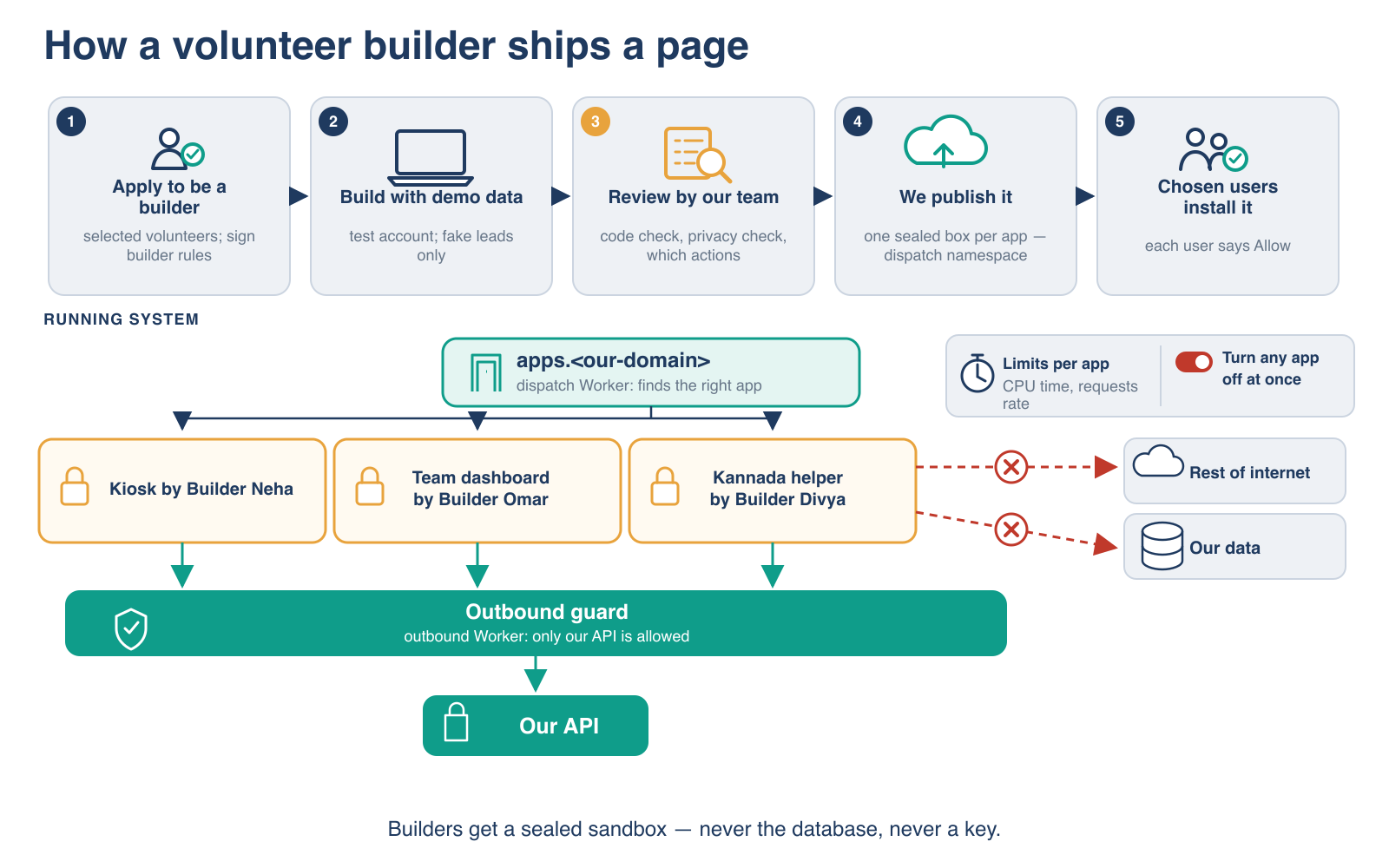
Diagram: how a volunteer builder ships a page. Five steps: apply to be a builder (selected volunteers sign builder rules); build with demo data (test account, fake leads only); review by our team (code check, privacy check, which actions); we publish it (one sealed box per app); chosen users install it (each user says Allow). Below, the running system: a dispatch Worker finds the right app; example apps by invented builders are a kiosk, a team dashboard and a Kannada helper; there are limits per app for CPU time and requests, and any app can be turned off at once. An outbound guard lets apps reach only our API, not the rest of the internet and not our data directly.
Builders get a sealed sandbox, never the database and never a key.
  • Who can build: volunteers nominated by a coordinator, active for at least 3 months, who sign the builder rules and finish a short training. Start with 10–20.
  • Practice first: builders work on our test site with practice data. They never get Cloudflare passwords or keys.
  • Sealed box: each app runs alone. An outbound guard lets it call only our gate. The app has no direct access to any database or storage.
  • The builder's code never holds a key. Our part signs the user in and adds the key to each call to our gate.
  • Separate web address for builder pages, so our main app's sign-in never reaches builder code.

4. Catalogue, approval, audit and kill switch

Approval

Catalogue

We review and approve each app and each new version. An admin decides which roles and teams can see it. Each user installs it by tapping Allow.

Audit

Every call logged

Who asked, with which tool, about which record, and the result. The log holds record numbers only, never names, phones or text.

Limits

Quotas

A limit on calls per minute for each key and each app, and exact daily caps for changes.

Kill switch

Four ways to stop

(1) The user removes a tool. (2) An admin blocks one tool for everyone. (3) One switch turns off all outside access. (4) Any builder app can be turned off at once.

5. Privacy (India's DPDP law)

The NGO is responsible for participant data. A volunteer's own ChatGPT, Claude or Grok account belongs to an outside company. Sending participant data there is a legal decision for the owner. Until then, we use practice data only.

  • Phones partly hidden: only the last two digits. A link opens the lead in AOL-Connect, where the call button already works.
  • Few fields: first name and last initial. No email.
  • No notes to AI at first. Notes and free text need a separate permission and a separate owner decision. If allowed later, they are marked “data, not instructions”, and the real guard stays the human “yes”.
  • Consent words: if the owner says yes, the public form's privacy notice and consent change first.
  • Timing: the main DPDP duties start about May 2027. We build the log, notice and withdrawal parts now, so they are ready. A lawyer should confirm the dates.
  • No “send” tools: no tool sends messages or calls other websites. This removes one of the three ingredients that let an AI leak data.

For engineers

Technical deep dive

Open each part for the detail. Everything here is a proposal; nothing is built yet.

API layerA versioned public API that grows one action at a time
  • Our route table gets one new option per route: which key scope it needs. Routes without it stay app-only. This one switch is the whole “public API”.
  • Grant actions, not routes. Some app routes return several views. A key reaches only a listed method, path and view. The first key actions are small, bounded reads: one page, a fixed set of fields, the same visibility rules as the app.
  • Bulk reads (offline sync, exports) stay app-only.
  • The public subset lives under /api/v1/ as aliases of the same handlers. A future v2 is a new alias set, never a change in place.
  • The machine-readable description (OpenAPI) grows with each public action, from the validation schemas the routes already use. A test fails if a public action has no description.
  • Rejected: a separate API gateway (a second copy of routing and rules, which drifts) and GraphQL (unbounded queries against database limits).
OAuth 2.1 with PKCEPer-user, per-tool keys inside the same Worker
  • The authorization server runs inside our existing Worker, using Cloudflare's workers-oauth-provider library. It supports OAuth 2.1 with PKCE, client metadata documents, dynamic registration, protected resource metadata (RFC 9728) and resource indicators (RFC 8707). It stores only hashes of tokens.
  • Our existing sign-in page is the login step. A new, script-free consent page lists the scopes in plain words.
  • A token holds: user, chosen role membership, client, scopes and expiry. Access tokens last about an hour. Refresh tokens rotate and expire after 30 days.
  • Effective rights = the action is listed for scope S, the token has S, and the action runs the same checks as the app for that person and role.
  • Token actions accept only a bearer header and ignore cookies. App routes keep today's same-site protection. The consent page cannot be framed.
  • Client registration: client metadata documents first (ChatGPT prefers them), dynamic registration for older clients, pre-registered clients for builder apps.
  • Personal read-only key (step 2) for clients without OAuth, such as the xAI API: one role, 30 days, shown once, revocable.
  • Device flow (RFC 8628) for screens without a keyboard, such as an event-day kiosk.
  • Rejected: pasted personal API keys as the main path, Cloudflare Access as the volunteer login (built for staff tools, per-user cost above 50 users), an outside identity vendor, and hand-written OAuth.
Scopes mapped to personasFew, coarse scopes; the role still decides
Proposed scopes
ScopeMeaningRoles that may grant it
leads:readMy visible leads and follow-ups dueVolunteer, teacher, coordinator, org admin
leads:writeRecord a follow-up result, add a comment, set the next date (always with confirmation)All four
events:readEvents and sessions in my scopeAll four
events:writeRegister a person, mark attendanceTeacher, coordinator, org admin
team:readCounts and funnels for my teams, no personal dataCoordinator, org admin

Never by key in the first three steps: export, import, erase, password reset, member changes, and settings. Those stay in the main app. Reading notes is a separate later scope that needs its own owner decision.

For the Teachers CRM, its “area: action” permissions would map to scopes the same way, if the group team agrees.

MCP toolsOne stateless endpoint; the tool list follows the token
  • One /mcp endpoint on the same Worker, Streamable HTTP, stateless, built with Cloudflare's createMcpHandler. It accepts the current MCP version (2026-07-28) and the older versions clients still use.
  • It publishes protected resource metadata, checks that each token was made for this server, and never passes a token on.
  • Step 1 read tools: follow-ups due, find my lead, my upcoming events, team numbers (coordinators). Marked read-only. No free text.
  • Step 2 write tools, in two parts: the tool stores a pending change and returns a preview with a link “Confirm in AOL-Connect”. The pending change is single-use and expires in 10 minutes. The write is one conditional database update.
  • Tool hints such as “read-only” or “destructive” help the client, but they are not the guard. The guard is on our server.
  • Answers carry minimum fields: first name and last initial, phone masked to the last two digits, no email.
  • Rejected: a confirm tool the AI can call, client-side approval prompts as the only guard, a chatbot we host and pay for, and write tools in step 1.
Sandbox and outbound WorkerHow builder pages run on Workers for Platforms
  • One production dispatch namespace, as Cloudflare advises, with tags per builder. Each app is one user Worker.
  • A dispatch Worker on the builder domain finds the app and refuses disabled ones.
  • An outbound Worker sees every outgoing request and allows only our API host.
  • Custom limits cap CPU time and sub-requests per call.
  • Apps get no database, storage or Durable Object bindings.
  • The dispatch Worker runs the sign-in for every app and keeps the user's token. The outbound Worker adds it to calls to our API. The builder writes a plain request to /api/v1/.
  • Cloudflare's default “untrusted” isolation: no shared cache between apps.
  • A strict Content Security Policy on every page limits where the browser may send data. Review checks for other ways out. The builder agreement and the kill switch cover what remains.
  • Rejected: builders deploying to their own Cloudflare accounts (we could not enforce limits or the kill switch) and builders reading the database.
Quotas, audit and kill switchCheap first gate, exact caps, four ways to stop
  • Cloudflare's rate-limit binding per token and per client (for example 60 calls a minute) as a cheap first gate. These counters are approximate, so exact caps (such as changes per day) are counted in the database.
  • A new read log records time, user, role, client, tool, record type, record numbers and outcome. No names, phones or text. Kept for one year, the period the DPDP Rules name for logs.
  • Changes go through existing actions, which already write the audit log. We add which tool made the change.
  • Kill switch at four levels: user, client or app for everyone, the whole deployment, and any single builder app.
Review process for builder appsAutomatic checks, then a person
  1. The builder applies, is nominated by a coordinator, signs the builder rules (confidentiality, DPDP duties, no copying data out) and finishes training.
  2. The builder develops against the test site with practice data and test keys.
  3. Automatic checks: size, requested scopes, no secrets in code.
  4. A person reviews any app that asks for a write scope, and checks privacy and ways data could leave.
  5. Each new version is reviewed again. Approved apps appear in the catalogue only for the roles and teams the admin allows.
  6. Effort: a few hours a week for every 20 builders.
Top risks and their guardsWhat could go wrong, and what would show it
Risk register
RiskGuardSignal that it is still open
A key sees more than the personListed actions only, same checks as the app, closed by defaultA test that compares each key answer with the app's answer, for each role, finds a difference
A hidden instruction in a note causes a wrong changeEvery change needs a human tap on our page; no send toolsA change in the log with no confirmation
Data at outside AI companiesOwner decision first; practice data; minimum fieldsFull phone digits in a tool answer
A builder copies data outOutbound guard; no export scope; builder agreementThe outbound log shows another host
A stolen keyShort-lived keys, rotation, revoke screen, rate limitCalls after a revoke

Plan

Roadmap: four steps, each needs a yes

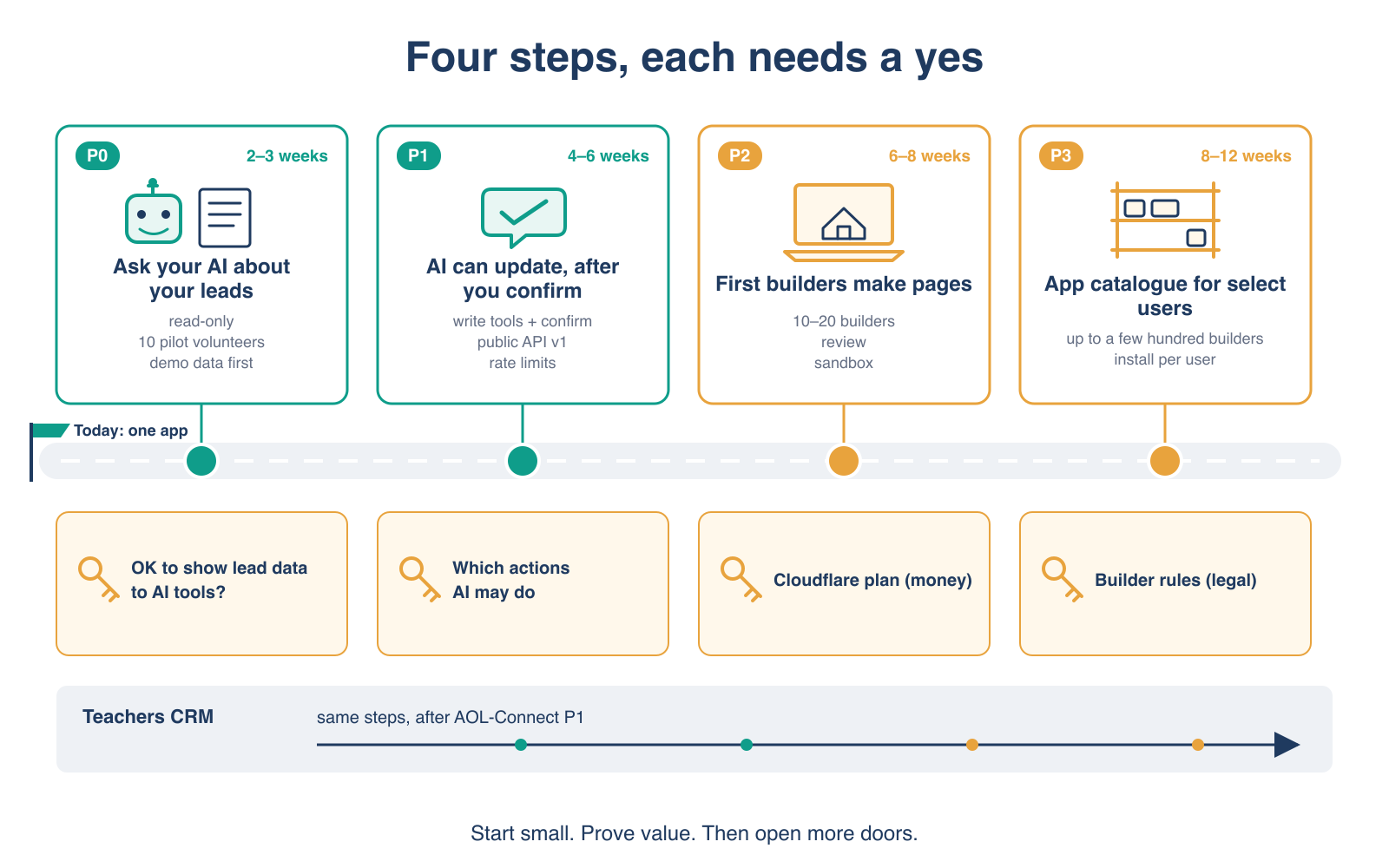
Roadmap with four steps from today's single app. P0, 2 to 3 weeks: ask your AI about your leads, read-only, 10 pilot volunteers, demo data first. P1, 4 to 6 weeks: AI can update after you confirm, write tools with confirmation, public API v1, rate limits. P2, 6 to 8 weeks: first builders make pages, 10 to 20 builders, review, sandbox. P3, 8 to 12 weeks: app catalogue for select users, up to a few hundred builders, install per user. Owner decisions sit under each step: is it OK to show lead data to AI tools; which actions AI may do; the Cloudflare plan (money) and builder rules (legal). The Teachers CRM follows the same steps after AOL-Connect P1.
Start small. Prove value. Then open more doors.
Phases
StepWhat shipsEffortOwner decision
1. Ask your AIA 3–4 day technical spike, then the read-only connector, consent page, four read tools, masked answers, read log, rate limit and switch. Test site, practice data, about 10 volunteers.Spike + 2–3 weeksPractice data or real data (legal)
2. AI can update, after you confirmWrite tools with confirm-in-our-app; public API v1 (about 25 actions) with description; “Connected apps” screen; personal read key; device flow.4–6 weeksWhich actions AI may do; notice and consent text
3. First buildersSealed boxes, outbound guard, limits, app tables, review checklist, 10–20 builders, builder web address.6–8 weeksMoney; builder rules; Cloudflare account access
4. App catalogueCatalogue screen, install per user, quotas per app, up to a few hundred builders. Teachers CRM follows if the group team agrees.8–12 weeksBuilder terms at scale; Teachers CRM adoption

The smallest first step (2–3 weeks)

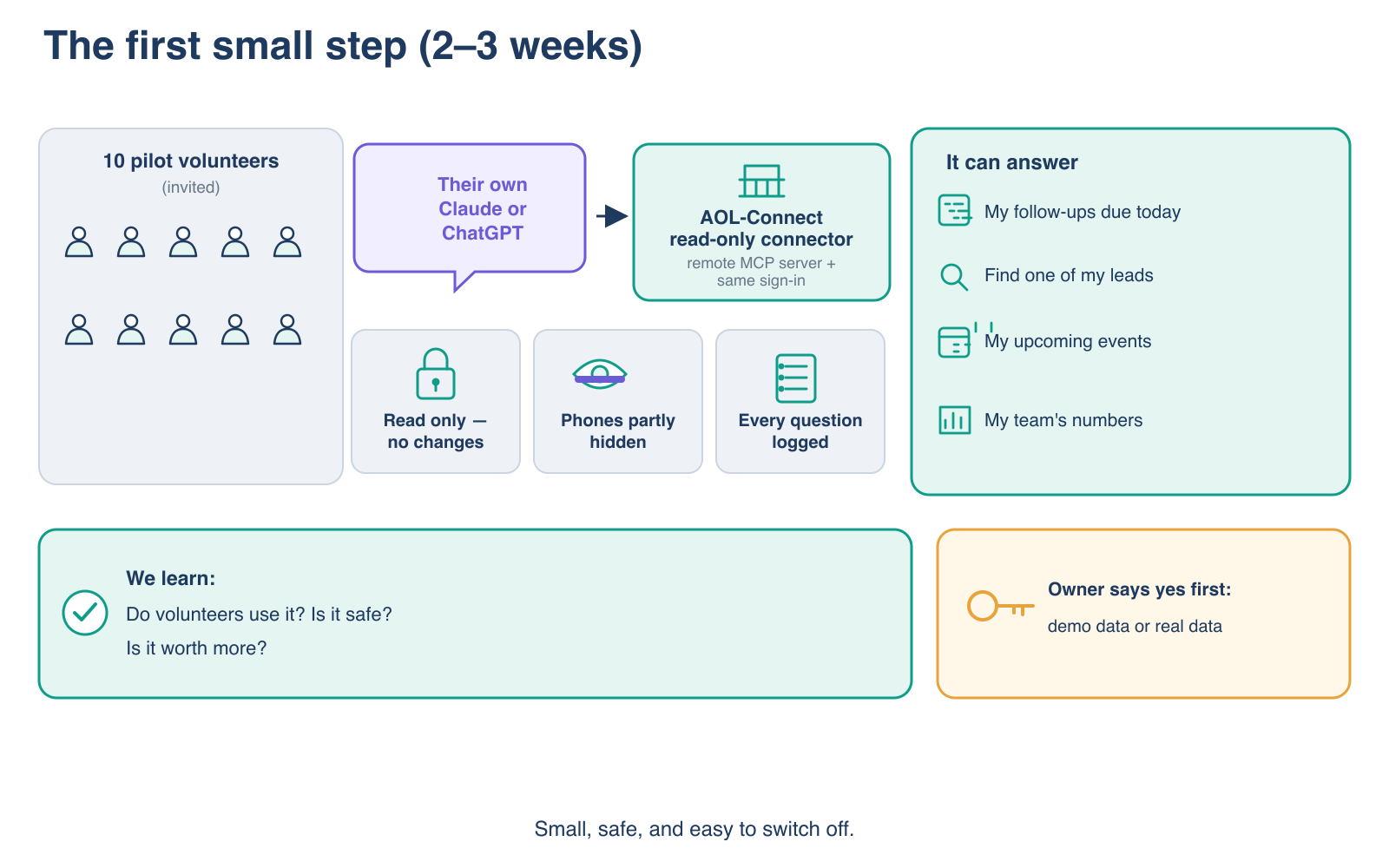
Diagram: the first small step, 2 to 3 weeks. Ten invited pilot volunteers use their own Claude or ChatGPT with a read-only AOL-Connect connector, a remote MCP server with the same sign-in. It can answer four questions: my follow-ups due today, find one of my leads, my upcoming events, and my team's numbers. Safety: read only with no changes, phones partly hidden, every question logged. We learn: do volunteers use it, is it safe, is it worth more. The owner says yes first to demo data or real data.
Small, safe, and easy to switch off.

In scope

  • AOL-Connect only, test site, practice data
  • About 10 invited volunteers and one coordinator
  • Claude (its free plan allows one connector) or ChatGPT
  • Four read-only questions, no notes or free text
  • Phones partly hidden; every question logged; one switch turns it off

Not in scope

  • Changes of any kind
  • Notes and free text
  • Bulk reads and exports
  • Builder pages, Grok, the Teachers CRM
  • Real participant data

Done means: a pilot volunteer adds the connector, signs in, asks “Who should I call today?”, and gets only her own practice leads. A volunteer in another team sees none of them. The switch turns it off within a minute. Every question appears in the log.

After two weeks we measure: weekly active pilot users, questions per user, and any answer that showed data outside scope. That last number must be zero.

New door · plan only

WhatsApp and Telegram: buttons first

Volunteers tap buttons in a chat, like a ticket-booking bot. No typing in the first version. The bot uses the same gate and the same rules as the app and the AI connector.

TelegramVolunteer · step C1

“My follow-ups today”

Tap, pick a lead from a list of 10, tap No answer, tap Tomorrow. The app shows the follow-up at once.

TelegramVolunteer · step C1

Team inbox

See new leads for the team and tap Claim. If two people tap together, only one gets it, as in the app.

TelegramTeacher · step C1

Attendance

Pick today's session. One person per screen: Came or Did not come.

TelegramCoordinator · after a new scope

Intake and reassign

Accept or reject a new form. Give a lead to another volunteer. Each change asks Confirm first. These need a new, reviewed key scope.

WhatsAppStaff · step C2

The same menus on WhatsApp

When Meta has verified the NGO and we have a number. Lists show 10 rows, messages 3 buttons.

WhatsAppParticipant · step C3

Programmes and registration

See upcoming programmes, register with a short form, ask for a call back, or stop messages. Needs consent text first.

Why staff first, and Telegram first

Staff first

  • Staff already sign in and have a team scope. Participants have no login today.
  • Every staff action already exists in the app. The bot is one more door.
  • Participants need consent text, opt-in and paid Meta templates: owner decisions.

Telegram first

  • Free to use. No business verification. Only a bot token is needed.
  • It proves the menus and the safety rules while Meta checks the NGO.
  • WhatsApp then uses the same menu file. Staff replies there are free inside 24 hours.

Safety rules

Link with a code
You sign in to the app and get a one-time code. You send it to the bot. A phone number alone never links, because families share phones.
Your scope only
The bot acts with your limited key. A chat message can never name a role or a team. Other teams' leads stay hidden.
Each tap counts once
The chat apps resend messages when the network fails. Every change the bot can make is safe to repeat, so one tap writes one row.
Little data in chat
First name, last initial and two phone digits. No full phone, no notes. Calls and WhatsApp to a lead stay in the app.
Checked senders
We check WhatsApp's signature and Telegram's secret on every message. Fakes are refused.
Text is data
In version 1 typed text gets the menu back. Later an AI may turn text into a menu choice, but you still tap Confirm and it gets no wider access.
Steps for chat (estimates, after AI connector step 1)
StepWhat shipsEffortOwner decision
C0 SpikeTelegram bot on the test site: link code, one read, one write, repeat check.about 3 daysBot token
C1 Telegram staff pilotVolunteer menus, confirm screens, limits, log, switch. 10 invited staff, practice data.8–10 daysNone more
C2 WhatsApp staffThe same menus on WhatsApp, with a Help row. Test number first. Practice data until the data decision.5–7 days + Meta waitVerification, number, cost cap
C3 ParticipantsProgramme list, register, call back, stop; short forms; consent.15–20 daysConsent text (legal), template budget
C4 Free textTyped text becomes a menu choice, then Confirm.8–10 daysWhich AI may read staff text
Credentials

Telegram bot and WhatsApp number

An organisation account creates the bot. For WhatsApp, a new number that is not on the WhatsApp app.

Legal

Meta verification and consent

Meta checks the NGO's papers. Lead names in chats and any participant bot need a decision under India's DPDP law. Until then, practice data only.

Money

A cost cap

Staff chats cost nothing. A daily WhatsApp reminder costs about INR 0.12 a message (third-party figure; check Meta's rate card). We propose no reminders in the pilot.

Done means: a pilot volunteer links Telegram, taps “My follow-ups today”, sees only their own practice leads, logs “No answer, call tomorrow”, and the app shows it. A second tap writes nothing new. The switch stops the bot within a minute.

Sources: WhatsApp reply buttons · list messages · pricing · messaging limits · Telegram Bot API · Telegram Mini Apps (all read 14 Oct 2026)

Needs the owner

What only the owner can decide

Everything else, the team can decide and record. These four need you.

Legal

AI data consent

May real participant data (names, partly hidden phones, later notes) go to outside AI companies through a volunteer's own account? This needs new consent words under India's DPDP law. Until you say yes, we use practice data only.

Money

About USD 25 a month + a web address

Before step 3: Cloudflare Workers for Platforms at USD 25 a month, plus a separate web address for builder pages at about USD 10–20 a year. Steps 1 and 2 need no new money.

Organisation

Who may build

Who may become a builder, the rules they sign, and the training they take. Our proposal: nominated by a coordinator, active for 3 months, start with 10–20.

Group team

Teachers CRM

The Teachers CRM belongs to the group team. They decide if and when it follows the same steps. We only share the design.

References

Sources

Public pages, read on 13 October 2026. Some product details (for example which ChatGPT plans allow custom connectors) were not confirmed on official pages and are marked as such above.